---
title: Introducing RealityMAX AI Flows
description: Learn how RealityMAX AI Workflows let you create images, videos, and 3D content by connecting AI modules in a visual node-based system.
---
[Skip to content](https://help.realitymax.com/introducing-realitymax-ai-flows#main-content)
English
Show submenu for translations
[](https://realitymax.com/)
- [Read our guides](https://realitymax.com/guides/)
Open main navigation
Close main navigation
- [Read our guides](https://realitymax.com/guides/)
- English
Show submenu for translations
- Go to RealityMAX
Go to RealityMAX
Hello. How can we help you?
- There are no suggestions because the search field is empty.
1. [RealityMAX Help Center](https://help.realitymax.com/?hsLang=en)
2. [Reality AI Flows](https://help.realitymax.com/reality-ai-flows?hsLang=en)
# Introducing RealityMAX AI Flows
## Turn ideas into content by connecting intelligent building blocks
**RealityMAX AI Flows** let you create images, videos, 3D objects, and more by linking AI-powered modules in a visual node system. Each module can generate results on its own or work together with others, allowing you to transform a simple prompt into complex creative outputs.
Each module can:
- Generate results on its own using a prompt
- Be connected to other modules to create more advanced outputs
This allows you to build flexible flows combining images, videos, 3D objects, text, and AI assistants into a single creative pipeline.
### What Is a Module?
A module is a building block that produces a result.
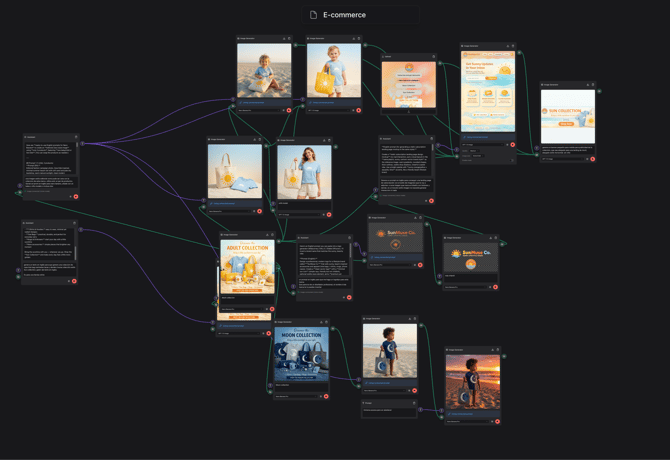
Modules can generate content from prompts, or they can use existing assets as a starting point. For example, you can upload an image or a video into a module and then use prompts to modify or expand it.
This makes it easy to begin a flow either from a new idea or from existing content.
Modules include:
- **Upload Module**
Upload images or videos to use as a starting point or reference.
- **Image Generator**
Generate or edit images using prompts.
- **Video Generator**
Generate or transform video content.
- **3D Generator**
Generate or modify 3D objects.
- **Assistant**
Use AI logic to guide or automate tasks.
- **Prompt**
Create prompts or written content.
Each module produces an output that can be used by another module.
### How Can I Access RealityMAX AI Flows?
After **signing up** or **logging in**, you can choose your dashboard:
- Reality 3D Composer
- Reality AI Flows
Select **Reality AI Flows** to access RealityMAX AI Flows.
### Tips and Tricks (to be expanded)
- Press **F** to view the entire workspace.
- Press **F** while a module is selected to focus on it.
- [Reality 3D Composer](https://help.realitymax.com/reality-3d-composer?hsLang=en#main-content)
- [Introduction](https://help.realitymax.com/reality-3d-composer?hsLang=en#introduction)
- [Tutorials - Dashboard](https://help.realitymax.com/reality-3d-composer?hsLang=en#tutorials-dashboard)
- [Tutorials - Scene](https://help.realitymax.com/reality-3d-composer?hsLang=en#tutorials-scene)
- [Tutorials - Objects and materials](https://help.realitymax.com/reality-3d-composer?hsLang=en#tutorials-objects-and-materials)
- [Tutorials - Collaborate](https://help.realitymax.com/reality-3d-composer?hsLang=en#tutorials-collaborate)
- [Tutorials - Publish](https://help.realitymax.com/reality-3d-composer?hsLang=en#tutorials-publish)
- [Tutorials - Live](https://help.realitymax.com/reality-3d-composer?hsLang=en#tutorials-live)
- [Reality AI Flows](https://help.realitymax.com/reality-ai-flows?hsLang=en)
- [Account & Billing](https://help.realitymax.com/account-billing?hsLang=en#main-content)
- [Account](https://help.realitymax.com/account-billing?hsLang=en#account)
- [Billing](https://help.realitymax.com/account-billing?hsLang=en#billing)
- [General FAQs](https://help.realitymax.com/general-faqs?hsLang=en#main-content)
- [Reality 3D Composer - Upload & Edit](https://help.realitymax.com/general-faqs?hsLang=en#reality-3d-composer-upload-edit)
- [Reality 3D Composer - Share](https://help.realitymax.com/general-faqs?hsLang=en#reality-3d-composer-share)
- [Reality 3D Composer](https://help.realitymax.com/general-faqs?hsLang=en#reality-3d-composer)
- [3D modeling](https://help.realitymax.com/general-faqs?hsLang=en#3d-modeling)
[](https://realitymax.com)
RealityMAX Help Center
Copyright © 2026, Digital-Link, LLC